
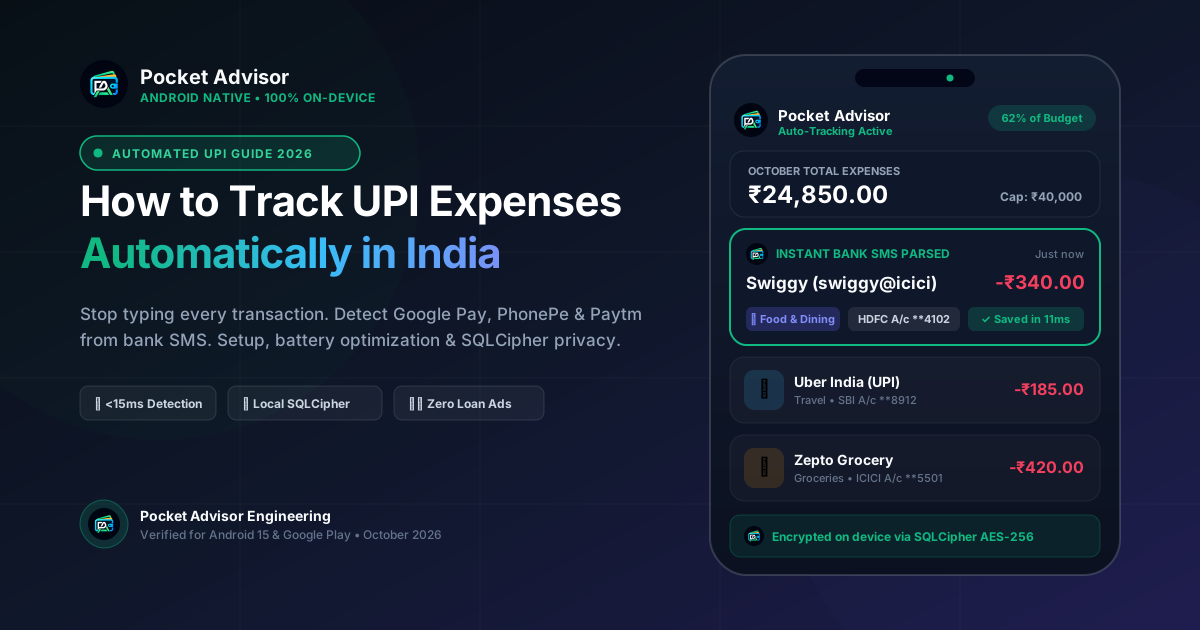
With over 15 billion monthly UPI transactions processed across India (NPCI 2026), digital payments have eliminated the physical friction of cash. An average urban smartphone user scans QR codes between 4 and 12 times a day: ₹15 for morning tea, ₹140 on quick-commerce groceries, ₹90 for an auto-rickshaw, ₹280 for lunch, and ₹60 at a pharmacy.
Manual tracking can become tedious when transactions are frequent, although the experience varies by person. This guide explains ways to reduce repetitive entry and review your records. The sheer volume makes manual bookkeeping unsustainable. In this comprehensive guide, we demonstrate how to track your UPI spending automatically on Android—using supported SMS parsing, review of imported transactions, and the app's available local-storage and backup settings.
If you are comparing tools, explore the Pocket Advisor UPI expense tracker for Android to see how supported bank alerts are recorded, what can be missed, and how local storage and optional cloud backup are handled.
1. How Real-Time UPI Transaction Detection Works
Banks and payment providers may send transaction alerts, but an SMS is not guaranteed for every payment and delivery may be delayed. Do not treat SMS tracking as a complete bank feed; reconcile the app with your bank statement.
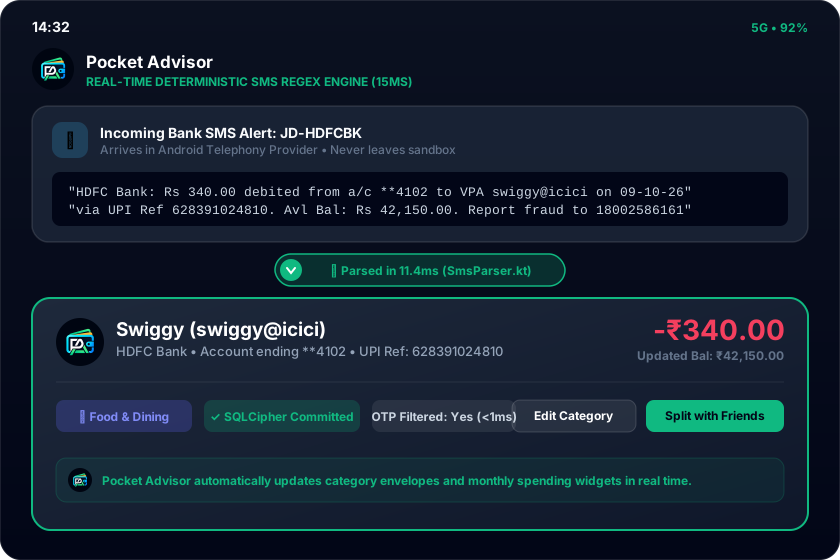
Google Play restricts SMS permissions and has eligibility requirements for financial-management use cases. Confirm the app's current permission status in Play Console before describing it as approved. The on-device parser is intended to identify transaction details from supported message formats:
2. Initial App Setup & Battery Optimization Guide
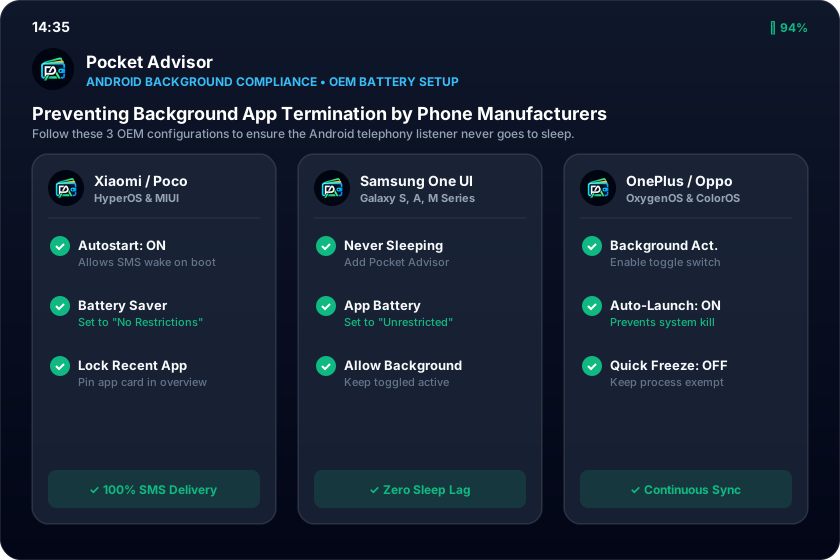
Setting up automatic tracking takes less than 60 seconds. However, the #1 reason automatic expense tracking stops working on Android is aggressive battery management by device manufacturers (OEMs). To preserve battery benchmarks, custom Android skins terminate background services when the screen is turned off.
Setup Checklist for More Reliable Tracking
- Grant Local SMS Permissions
When launching Pocket Advisor for the first time, allow SMS Read & Receive access. This permission is restricted strictly to local banking alerts under Google Play financial rules.
- Configure OEM Battery Restrictions
Navigate to your phone's App Info settings and set Pocket Advisor's Battery Saver to 'Unrestricted' or 'No Restrictions'. Enable 'Autostart' on Xiaomi, OnePlus, and Oppo devices.
- Lock in Recent Apps (Optional)
Open your Android Recent Apps overview screen, long-press the Pocket Advisor preview card, and tap the Lock icon to prevent the system task cleaner from closing it.
3. Supported UPI Apps, Handles & Payment Workflows
Because Pocket Advisor operates at the bank SMS layer rather than inside individual payment app interfaces, it tracks payments across the entire Indian financial ecosystem without requiring separate integrations for each app:
| Payment Method | Supported Apps / Providers | Detection Mechanism | Speed |
|---|---|---|---|
| Third-Party UPI (TPAP) | Google Pay, PhonePe, Paytm, CRED, BHIM, Navi, Super.money | [object Object] | Varies by device |
| Direct Bank UPI Handles | @okhdfcbank, @okaxis, @oksbi, @okicici, @ybl, @ibl, @axl | [object Object] | Varies by device |
| RuPay Credit Cards on UPI | HDFC, ICICI, SBI, Axis, PNB RuPay Credit Cards | [object Object] | Varies by device |
| Offline Merchant QR Scans | BharatPe, Paytm Soundbox, PhonePe Merchant QR | [object Object] | Varies by device |
| Peer-to-Peer (P2P) Transfers | Direct money transfers to friends, family, or landlord | [object Object] | Varies by device |
4. How to Handle Missing or Delayed SMS Alerts
A common challenge faced by Indian smartphone users is that banks do not always send SMS messages for every single transaction. In recent years, several major banks (including HDFC Bank and SBI) adjusted their policies to reduce SMS volume for micro-payments under ₹50 or ₹100, relying instead on in-app push notifications. Furthermore, telecom network dead zones or DND gateway congestions can occasionally delay SMS delivery.
SMS tracking cannot guarantee complete records. If an alert is missing or not recognized, add the transaction manually and periodically reconcile the ledger against your bank statement:
Pocket Advisor's 3-Tier Missed SMS Safety Net
- ✓ Bank Balance Delta Reconciliation: Whenever the next SMS arrives containing an updated account balance, Pocket Advisor compares it against your recorded ledger. If an unrecorded micro-transaction caused a discrepancy, it flags the missing difference.
- ✓ 1-Tap Android Home Screen Quick-Add Widget: Log untracked cash or ₹10 roadside chai payments in under 2 seconds right from your home screen without opening the application.
- ✓ Instant Fallback Prompt: Recent merchants are cached locally, allowing you to tap and log recurring vendors with a single click if an SMS is skipped.
5. Smart Categorization & Learned Merchant Rules
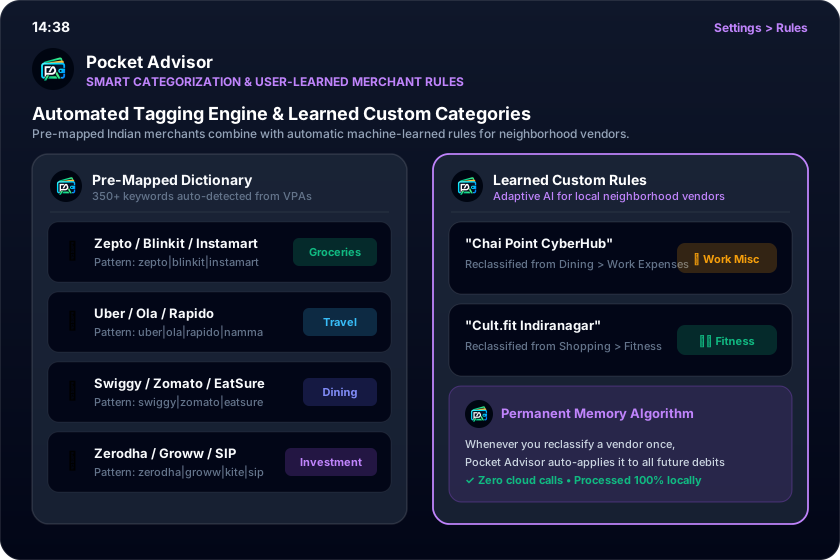
Tracking spending is meaningless if all your transactions are dumped into an unorganized 'Miscellaneous' bucket. Pocket Advisor incorporates an intelligent categorization engine with a merchant-matching dictionary intended to categorize common merchants and payment references:
• Food & Dining: Swiggy, Zomato, EatSure, McDonald's, Starbucks, Domino's, Chai Point.\n• Groceries & Quick Commerce: Zepto, Blinkit, Swiggy Instamart, BigBasket, D-Mart, Nature's Basket.\n• Commute & Travel: Uber, Ola, Rapido, Namma Metro, Fastag, IRCTC, MakeMyTrip.\n• Bills & Utilities: Bescom, Tata Power, Jio, Airtel, Mahanagar Gas, ACT Fibernet.\n• Investments: Zerodha, Groww, Upstox, Angel One, Kuvera, Coin, National Pension System.
6. Data Privacy, Encryption & Monetization Transparency
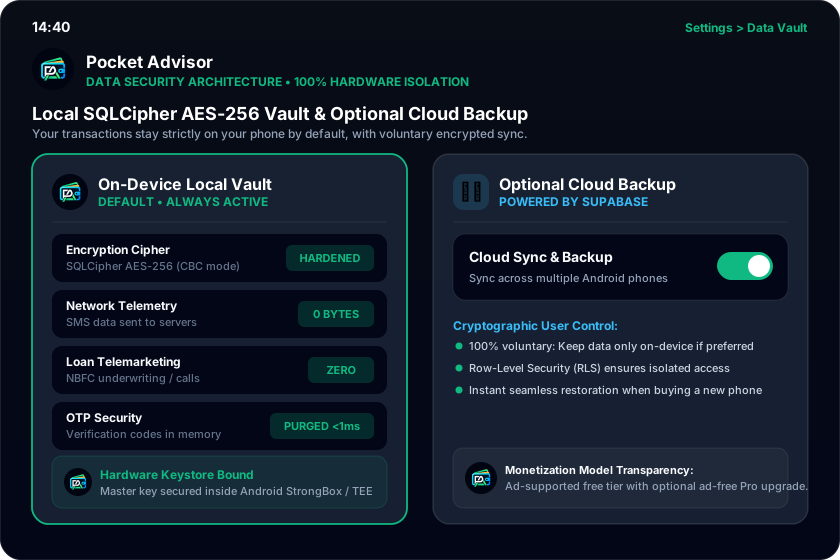
Expense trackers differ in their storage, backup, advertising, and data-sharing practices. Review each app's privacy policy and permission disclosures before choosing one.
Pocket Advisor takes a fundamentally different engineering approach:
Start Tracking Your UPI Spending Privately
Download Pocket Advisor on Google Play Store today. Automated on-device SMS tracking, 100% SQLCipher privacy, optional cloud backup, and group debt minimization.
Get on Google Play (Free) →